 Skip to content

Verified video guide
Colony Flow Level 701 Walkthrough
- Recordings checked 1
- Video length 4:17
Walkthrough video
This video could not be played here.
Board & pacing overview
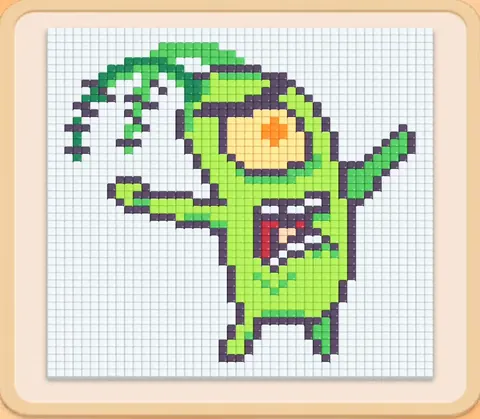
Level 701 is a green one-eyed cartoon character on a white background. The player clears white stacks in the opening 9 seconds, fills the tray by 0:31, and paces every tap around one emptying slot at a time.
Starting board
Front row (left to right) at 0:03–0:05: black 50, white 30, white 45, white 40, white 40. Second row: white 25, white 35, white 35, white 40, orange 8.
Mechanics & pacing
Five white stacks enter in the first 9 seconds to open the bottom background. No locks, shields, or linked stacks appear in the visible columns; the challenge is keeping tray slots rotating when green and black stacks hold until the upper body opens.
Not shown in the video
No difficulty banner is shown at 0:03, and the recording cuts off at 4:17 right after the board clears without showing the Victory screen or coin reward.
Step-by-step walkthrough
Times like 0:31 refer to the walkthrough video. Key clicks and checkpoints are highlighted.
Open all-white across columns 2, 4, and 5
Tap down column 2 first (white 30, white 35, and white 50 at 0:07, uncovering green 30 and green 20), then send white 40 and white 40 from columns 4 and 5 (0:09). All five slots start on white (21, 27, 43, 40, 31), clearing the bottom white border.
Add black 45 and green 30, then pace from 0:31
As the first white stacks clear (0:18), send white 45, white 40, and white 35 (0:22), followed by black 45 (0:26) and green 30 (0:31). By 0:31 all five tray slots are taken (white 3, white 4, black 25, green 20, white 6). From here, wait for a slot to empty before you send the next stack.
Clear the orange details, legs, and lower body
At 1:05, orange 8 clears the eye and mouth details while green ants work on the torso. Around 1:35 the legs, mouth, lower body, and bottom white background are gone, leaving the eye and antennae.
Wait out the 2:45 full-tray choke on the top band
At 2:45 only the top band is left: the antennae, the top of the head and the raised arm. The tray is full again, with green 35, orange 2, yellow 9, white 6, black 22. Let those clear through 3:15–3:40 as the board narrows to one stack column.
Finish the final white strip to empty the board
By 3:58 a thin strip of white and green at the top is all that remains (green 1, white 11, black 1, white 9, green 14 in tray). The last white stack (13) enters by 4:06, the board is empty at 4:10–4:14, and the video ends at 4:17 before the Victory screen.
Picture: a green one-eyed cartoon character with long antennae and a wide-open mouth, on a white background
Source & verification
Source (Walkthrough)
Video: Colony Flow! Level 701 Walkthrough | ABI GAMES Solution & Gameplay (New Update) (4:17)
Creator: Crazy Games Walkthrough
Checked on :
- Footage is Colony Flow!
- The game shows level 701
- Runs from the start until the picture is cleared
- Allowed to play on other sites
What this recording shows
- The video opens on the game's loading screen; "Level 701" is shown at the top of the board from about 0:03.
- No difficulty banner is shown when the level starts.
- The video stops on the cleared board and does not show the Victory screen.