 Skip to content

Verified video guide
Colony Flow Level 740 Walkthrough
- Difficulty shown in game Super Hard
- Recordings checked 1
- Video length 9:19
Walkthrough video
This video could not be played here.
Board & pacing overview
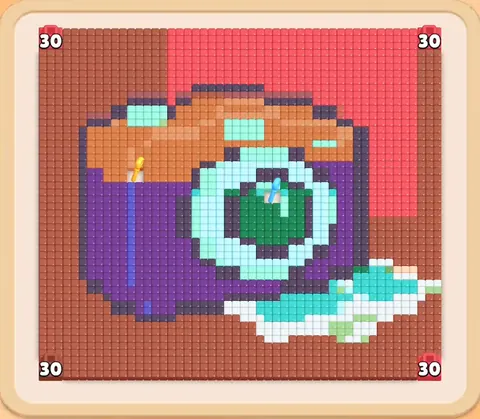
Level 740 is a purple camera on a red/maroon background that opens with a "SUPER HARD LEVEL" banner. The tray fills at 0:15 and 1:02, blue shields block two columns early, and linked clusters plus a cyan lock shape the end game.
Starting board
Front row (left to right) at 0:05: black 5, red 95, brown 55, brown 35, brown 45. Two blue shield stacks marked 4 sit in columns 3 and 5; picture corners carry frame counters (30, 30, 20, 30). A yellow key sits at the camera's upper-left and a cyan key sits inside the lens.
Mechanics & pacing
Opening brown and red taps fill all 5 slots by 0:15 while shields count down as earlier stacks clear. The yellow lock opens between 5:10 and 5:50 (uncovering purple 50 and a 2 shield); the cyan lock stays closed until the lens center clears around 8:55.
Not shown in the video
The exact countdown rule for the blue shields (observed dropping 4→3→2→1→0 across stacks) and how the four corner frame counters (30/30/20/30) relate to tray stacks are not stated on screen.
Step-by-step walkthrough
Times like 0:31 refer to the walkthrough video. Key clicks and checkpoints are highlighted.
Open brown and red background stacks to 0:15
Tap brown 55 (col 3 at 0:07), brown 35 and brown 45 (cols 4–5 at 0:09), then brown 55 and red 95 (0:11). All five slots are full at 0:15 (brown 29, 11, 23, red 40, 82), clearing the outer maroon/red border and dropping the corner markers by 0:20.
Pace the 1:02 refill on the white-and-teal highlight
As slots open (0:35–0:45), send black 5, indigo 17, black 35, peach 3, and white 72 until the tray fills again at 1:02. White ants begin clearing the white-and-teal highlight at the lower right of the camera; wait for empty slots before tapping more.
Work active columns while blue shields count down
Two blue shield stacks start at 4 (0:05), drop to 3 and 2 by 0:15, and reach 1 and 3 by 1:02. The left shield opens by 1:30 (teal 66 in col 1); the middle shield stays at 3 until 5:50 and drops to 1 at 6:10. Clear other stacks while shields tick down.
Clear the lower background and unlock the yellow lock
At 4:32 the red background below the camera is gone while the right-side strip remains, and both locks are still closed. Between 5:10 and 5:50, ants reach the upper-left yellow key and the yellow lock in column 2 opens.
Reserve slots for linked clusters and open the cyan lock
Late game brings linked three-stack clusters (purple 50–brown 50–brown 30 at 7:32; light-blue 36–brown 35–green 26 at 8:00–8:30)—keep enough slots open for all parts. After ants clear the lens center (8:55), the cyan lock opens, the last red stack finishes (9:10), and Victory appears at 9:17.
Picture: a purple camera on a red background, with a teal-and-white lens and a green center
Source & verification
Source (Walkthrough)
Video: Colony Flow! Level 740 Walkthrough | ABI GAMES Solution & Gameplay (New Update) (9:19)
Creator: Crazy Games Walkthrough
Checked on :
- Footage is Colony Flow!
- The game shows level 740
- Runs from the start until the picture is cleared
- Allowed to play on other sites
What this recording shows
- The level starts with a "SUPER HARD LEVEL" banner and an empty tray.